



Activity History — Who Changed What, and When, on Every Record
Every field edit, automation change, and communication is logged automatically on the Record—giving teams a searchable audit trail without setup, spreadsheet exports, or asking around.
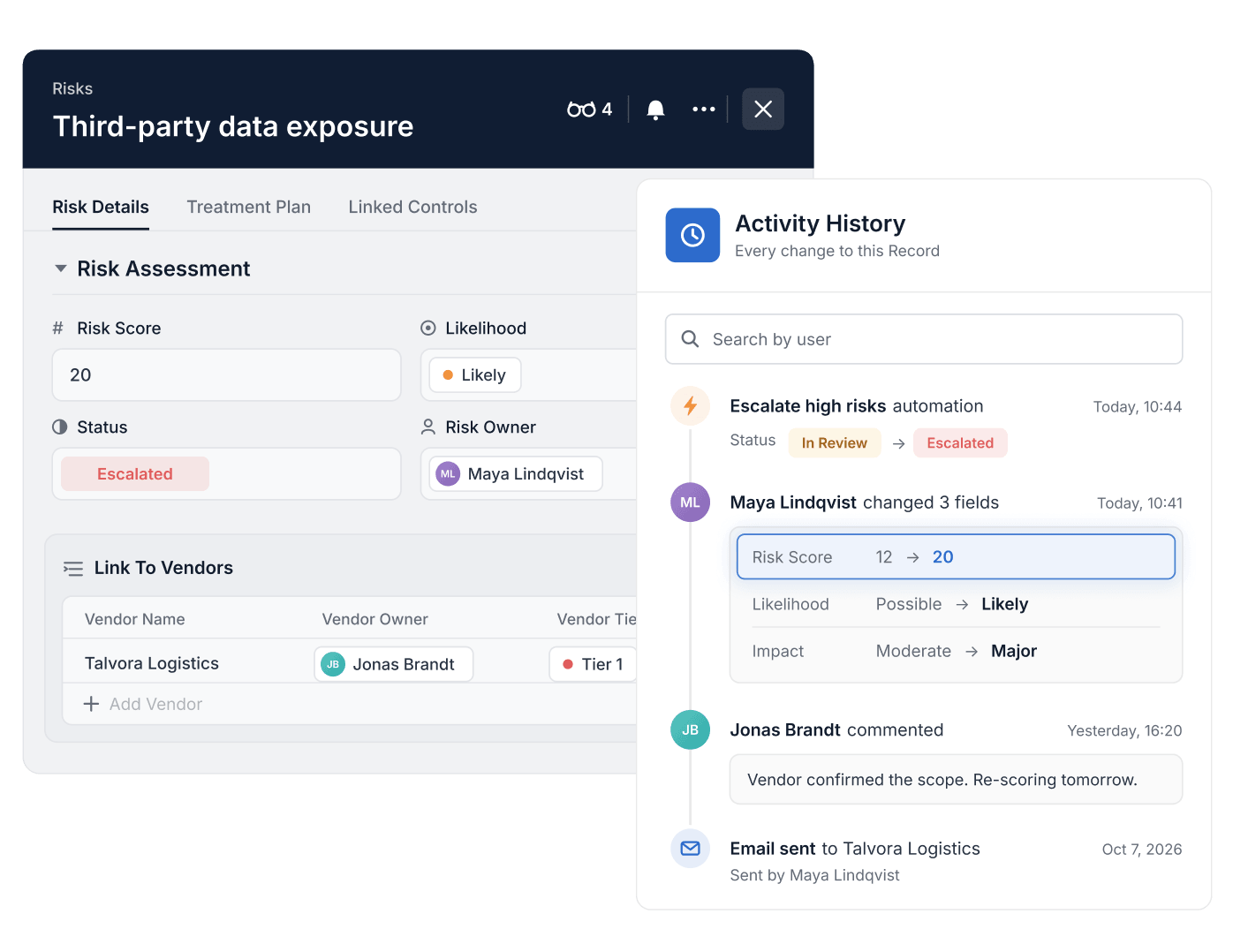
- Activity History is enabled on every Table with no setup and is available on every plan.
- Retention is 1 year on Team, 2 years on Professional and 3 years on Enterprise and Signature.
- Each entry records who changed what and when, with previous and current values; changes by one user within 3 minutes are consolidated.
- Automations appear by name with a lightning bolt icon, and comments and emails sent through the Communication Center are captured.
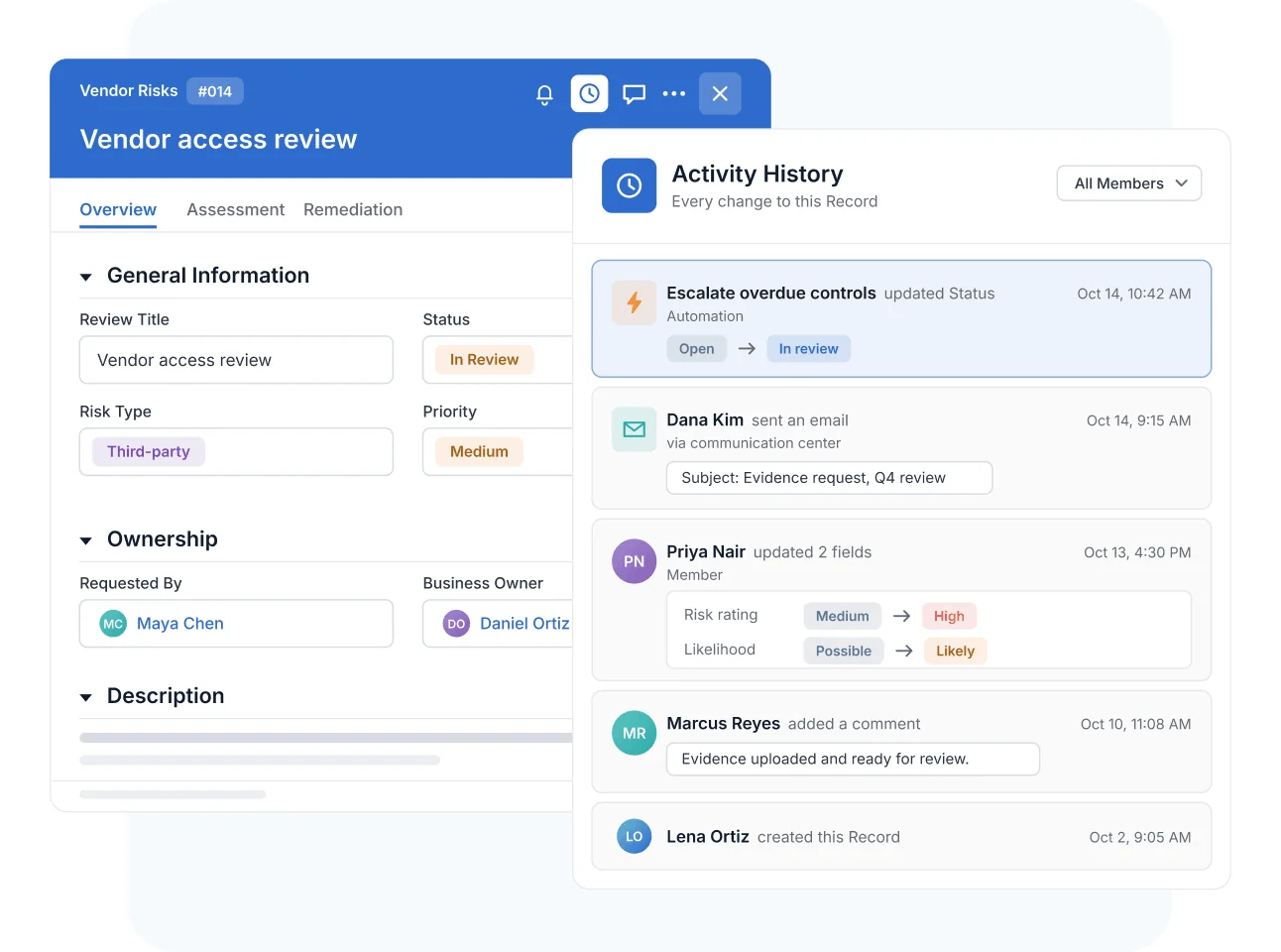
- The panel opens from the clock icon in the record and can be filtered by member.
What Is Activity History?
Activity History is a SmartSuite capability that automatically records every change made to a Record—who made it, what changed, and when—in a clock-icon panel inside the expanded Record view. It helps GRC, IT, project, and business operations teams verify changes and stay audit-ready—no setup required, on every Table. Retention scales by plan: 1 year on Team, 2 years on Professional, and 3 years on Enterprise.
Automatic Audit Trail
Log Every Change by Users, Automations, and Communications
Activity History captures field modifications by Members, changes made by Automations—shown with a lightning-bolt icon and the automation's name—and communications including comments and emails sent through the communication center. Record creation and last-updated timestamps sit alongside the identity behind each change and the specific detail of what was modified.
It's enabled automatically on every Table, so the trail exists before anyone thinks to ask for it.
Search and Consolidation
Find the Change You Need Without Reading Every Entry
Filter the log to changes made by a specific user with the built-in search, and read batches at a glance: all changes one user makes within a 3-minute window are consolidated into a single entry. A teammate's twenty quick edits show as one change, not twenty lines of noise.

Retention and Governance
Retain History by Plan for Long-Term Traceability
Activity History is retained for 1 year on Team, 2 years on Professional, and 3 years on Enterprise—so per-Record traceability covers the review periods your audits look back over.

Activity History
Auditors, risk committees, and regulators all ask the same question: what happened to this record, and who was behind it? Activity History makes the answer a lookup instead of an investigation.
Compliance staff filter a Record's history by user to confirm exactly who modified a sensitive control or risk entry and when—evidence pulled from the trail, not reconstructed from memory.
When a risk's rating changes in the register, the Record's history shows who adjusted it, what was modified, and when. Every movement in the risk register carries an owner and a timestamp—ready for the next committee review.
When auditors sample records, the team opens each Record's history to show who changed what and when across the retention window—helping the organization stay audit-ready without a separate evidence scramble.
An issue owner reports a remediation step complete, and the reviewer confirms it in the log: the exact field edits, the Member who made them, and the timestamps—no follow-up thread required.
Activity History is a record-level audit trail that automatically tracks every change made to a Record—who made it, what changed, and when. It's accessible from the clock-icon panel inside the expanded Record view and is enabled on every Table with no setup.
Retention varies by plan: 1 year on Team, 2 years on Professional, and 3 years on Enterprise.
Yes. Changes made by Automations appear in the log with a lightning-bolt icon and the automation's name, alongside user edits and communications such as comments and emails sent via the communication center.
Yes. A built-in search filters the log to changes made by a specific user. To keep the log readable, all changes one user makes within a 3-minute window are consolidated into a single entry.
No. It's automatically enabled on all Tables—every Record starts building its change trail from creation, including creation and last-updated timestamps.
Answer “Who Changed This?” in Seconds, Not Meetings
An always-on, searchable change trail on every Record—ready when the review, the audit, or the question arrives.